
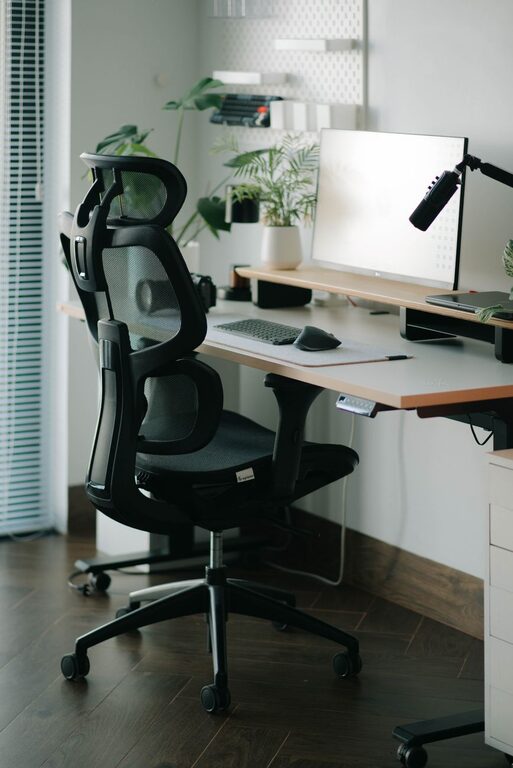
Creating a desk setup that promotes both focus and comfort is essential, whether you work from home, study, or simply spend hours at your desk each day. A thoughtfully arranged workspace can improve concentration, reduce physical discomfort, and help you maintain productivity throughout the day. In this post, we’ll explore practical tips to optimize your desk setup for better focus and comfort.
Why Your Desk Setup Matters
Your desk setup influences how you work and feel. An uncomfortable or cluttered space can cause distractions, fatigue, and even physical pain. On the other hand, a well-organized and ergonomically designed desk supports better posture, reduces strain, and creates an inviting environment to help you concentrate on tasks.
Essential Elements for Focus and Comfort
1. Choose the Right Desk and Chair
– Desk height: Ideally, your desk should allow your elbows to be at a 90-degree angle when typing or writing. This helps prevent strain on your shoulders and wrists.
– Comfortable chair: Invest in an adjustable chair with good lumbar support. Your feet should rest flat on the floor or on a footrest.
2. Proper Monitor Placement
– Position your monitor about an arm’s length away.
– The top of the screen should be at or slightly below eye level to avoid neck strain.
– If you use a laptop, consider a laptop stand and an external keyboard and mouse to create better ergonomics.
3. Optimize Lighting
– Use natural light whenever possible to reduce eye strain.
– Position your desk perpendicular to windows to avoid glare.
– Add a desk lamp with adjustable brightness and color temperature to prevent harsh lighting during evening hours.
4. Declutter and Organize
– Keep only essential items on your desk to minimize distractions.
– Use organizers, trays, or drawers to store supplies.
– Regularly tidy your workspace to maintain a clean environment conducive to focus.
5. Incorporate Personal Touches
– Adding plants or photos can make your desk feel inviting without overcrowding it.
– Choose a few items that inspire or motivate you.
Ergonomic Tips for Long Hours
Maintain Good Posture
– Sit with your back straight and shoulders relaxed.
– Your hips should be positioned slightly above your knees.
– Avoid crossing your legs to maintain proper circulation.
Take Breaks and Move Around
– Follow the 20-20-20 rule: every 20 minutes, look at something 20 feet away for 20 seconds.
– Stand up, stretch, or walk frequently to prevent stiffness.
Use Support Tools
– Wrist rests can help reduce pressure on wrists.
– A footrest can improve comfort if your feet don’t touch the floor.
Additional Tips for Enhancing Focus
Manage Noise Levels
– Use noise-cancelling headphones or play soft background music if you’re easily distracted.
– Consider a white noise machine or apps to block unwanted sounds.
Keep Hydrated and Snack Smart
– Keep a water bottle handy to stay hydrated.
– Choose healthy snacks to maintain energy without sugar crashes.
Plan Your Day
– Keep a planner or to-do list visible to stay on track.
– Break tasks into smaller steps to avoid feeling overwhelmed.
Setting Up for Different Needs
For Creative Work
– Allow space for sketching, brainstorming, or spreading out materials.
– Keep inspiring objects or a vision board nearby.
For Computer-Based Tasks
– Prioritize ergonomic accessories.
– Use multiple monitors if needed for multitasking.
For Students
– Ensure adequate space for textbooks, notebooks, and electronic devices.
– Incorporate storage solutions to keep supplies organized.
Final Thoughts
Your desk setup plays a significant role in your productivity and well-being. By focusing on ergonomics, organization, and personalization, you can create a workspace that supports your focus and comfort. Start with small changes, and adjust your setup as needed to find what works best for you. A well-designed desk setup can make your workdays more enjoyable and efficient.
—
By keeping these tips in mind, you can design a desk setup that helps you stay focused and comfortable no matter the task at hand.
About the Author